
SkyDeck for iPhone
See who unfollowed you on Bluesky
Bluesky shows a follower count and nothing else — when it drops, the reason vanishes with it. SkyDeck watches the relationship and keeps a dated list, on your phone.

Why this one is different
Most of what SkyDeck shows you is recoverable. A follow is a dated record, so the app can reconstruct when each person arrived, going back through your history. An unfollow is not a record — it is the absence of one. Removing a follow leaves nothing behind to read.
So Bluesky publishes who currently follows you, and nothing about who used to. No notification, no list. A follower count that falls by six over a week tells you six people left and not one thing more.
The only way to know who left is for something to have written down who was there before, and then to compare.
How SkyDeck does it
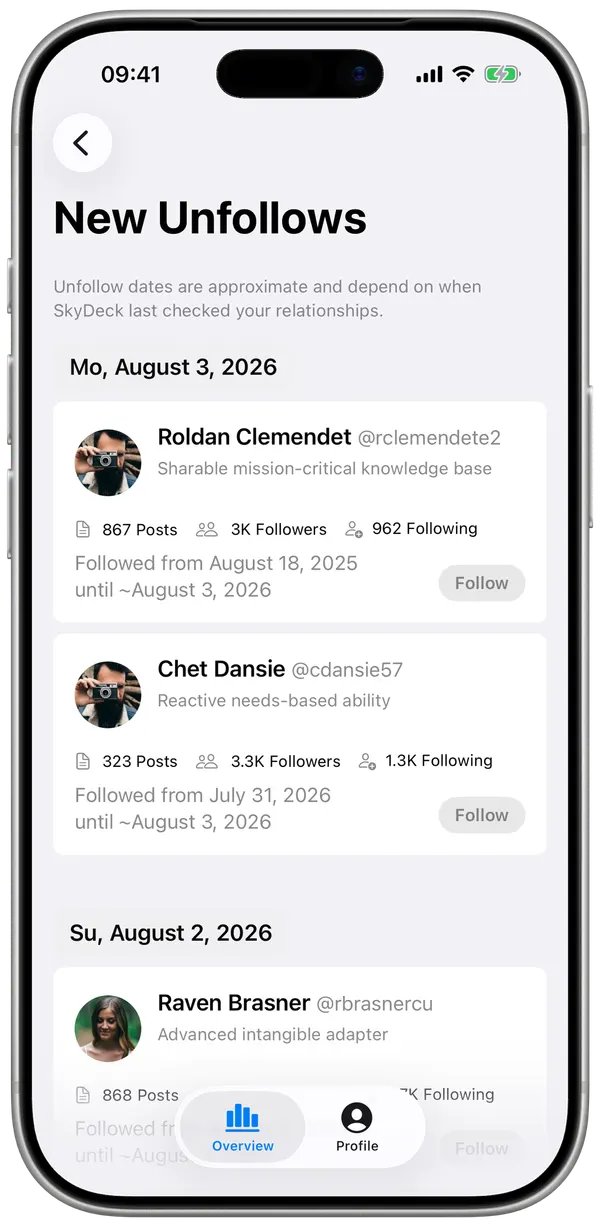
On first sync, SkyDeck records your current followers on your iPhone. On every sync after that it compares, and anything missing becomes an entry in New Unfollows — with the profile, the date they followed you, and the date they were last seen following you.
Because dates come from when the change was noticed rather than when it happened, the app says so on screen instead of quietly rounding. You will also see how long people tend to stay: the average across everyone who has ever unfollowed you.
The honest limitation
Unfollows from before your first sync cannot be shown. They are not hidden behind a subscription and they are not a missing feature: there is nothing left to query. The deletion did happen on the network at the time, so a service that had been listening continuously could have recorded it — but no app can go back and ask. Any tool offering you a complete unfollow history for an account it has never watched is making it up.
This is the one part of SkyDeck that argues for installing sooner rather than later. The rest — your growth, your posts, who engages with you — is there from the first sync, because those are records and they can be read.
A note on what this is for
Watching individual departures is a quick route to feeling bad about a social network. The useful reading is the shape, not the names: whether a week that looked flat actually hid twenty arrivals and twenty exits, or whether a particular kind of post reliably costs you followers.
SkyDeck shows the names because you asked for them. It does not notify anyone, and it does not turn them into a running score.
Answers
Questions
Can I see who unfollowed me on Bluesky?
Yes, from the moment a tool starts watching. Bluesky itself does not tell you, and it publishes no record of past unfollows, so what you can see is everything that happens after you install SkyDeck — not before.
Why can no app show unfollows from before I installed it?
Because unfollowing deletes the follow record. A follow is a dated record you can read; removing it leaves nothing behind to query. The deletion did travel over the network at the time, so a service that had been watching continuously could have caught it — but nothing you can ask after the fact will tell you. An unfollow is therefore detected by comparing two snapshots, which means the first one has to exist before anything can be compared.
How quickly does it notice?
SkyDeck syncs in the background and on demand. The date it shows is when it detected the change, which is why the app labels those dates as approximate rather than pretending to a precision it does not have.
Does the person get told?
No. SkyDeck reads public follow relationships and shows them to you. It never posts, follows or messages on your behalf, and nothing you do in the app is visible to anyone else.
Is this on the web too?
No. SkyDeck is a native iPhone app. The data lives on your device rather than on a server, which is also why nobody else can read it.
Get SkyDeck
Free to install. The history starts the day you do.
Elsewhere on this site